
AD FPS Booster Pack (26.x, 1.21) – MCPE/Bedrock
A resource pack for Bedrock Edition that optimizes performance through texture scaling, entity culling, and dynamic rendering to improve FPS on mobile, console, and low-end PC.
- 1.21
- 1.20
AD FPS Booster Pack is a resource pack for Bedrock Edition designed to improve performance on lower-end hardware. It uses automated optimizations to reduce frame drops and maintain smoother gameplay across mobile devices, consoles, and budget PCs.
Features
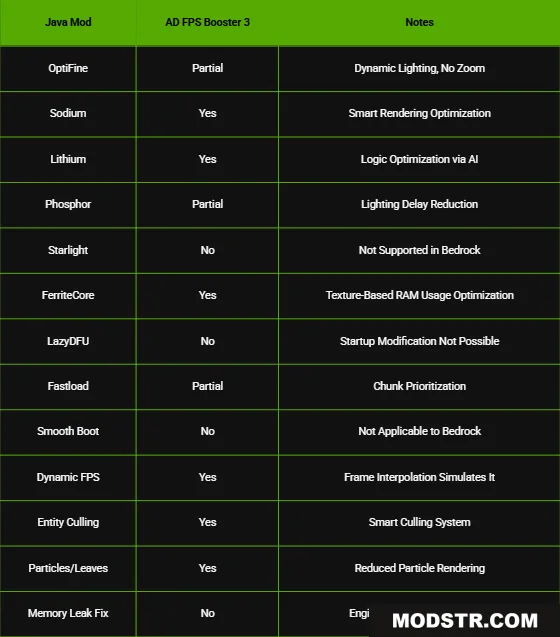
- Smart Rendering: Dynamically adjusts render distance and quality based on your movement and position.
- Texture Optimization: Automatically scales textures to maintain visual clarity while reducing memory usage.
- Frame Interpolation: Predicts frame transitions to reduce perceived stuttering.
- Entity Culling: Hides entities outside your view and unloaded chunks to free up processing power.
- Dynamic Lighting: Reduces the frequency of lighting recalculations to improve performance.
- Adaptive Chunk Loading: Prioritizes loading chunks in your direction of travel.
- Particle Reduction: Limits particle effects and visual clutter to lower GPU load.
Installation
- Download the pack file for your Bedrock Edition version.
- Open the downloaded file in Minecraft to import it.
- Create or open a world and activate the resource pack in World Settings.
- Adjust your video settings if needed to further optimize performance.
- Save and play.
Compatibility
This pack is compatible with Bedrock Edition version 1.21 and works on Windows 10/11, mobile, and consoles.
DOWNLOAD FILES
- mcaddon
- mcaddon